ライフゲーム
ライフゲーム Conway’s Game of Life
ライフゲーム(Conway’s Game of Life)は,数学者ジョン・ホートン・コンウェイ(John Horton Conway)が考案した2次元セル・オートマトン. ルールは以下のとおり.
各セルは状態「生」と「死」をもつ
誕生,生存,死亡のプロセスを経て,「生」と「死」の状態を更新する
8近傍のセルの状態により次の状態がきまる
遷移ルールは誕生,維持,過疎,過密の4つ
近傍の生きたセルの数が3つなら必ず「生」,2つなら状態変化なし,それ以外なら「死」,となる.
この単純なルールから,移動・振動・増殖といった「生命」を想起させる多様な振る舞いが現れる.
ライフゲーム遷移ルール
import numpy as np
import matplotlib.pyplot as plt
import plotly.graph_objects as go
以下のような関数を定義してみよう.
def 遷移ルール(3x3の配列(注目するセルとその8近傍)):
    近傍の「生(1)」のセルの数を計算する(np.sumを使ってみよう)

    近傍の「生」のセルがちょうど2つならば:
        次世代の(中心の)セルの状態は更新なし
    (2ではなく)近傍の「生」のセルがちょうど3つならば:
        次世代の(中心の)セルの状態は「生」
    それ以外の場合(過疎,過密):
        次世代の(中心の)セルの状態は「死」

return 次世代の(中心の)セルの状態Solution to Exercise 1
# ライフゲーム遷移ルールの定義
def rule(cells):
    """Conway's Game of Lifeの遷移ルール

    入力された3x3の配列に基づき次世代の状態を返す.
    * 誕生:8近傍中ちょうど3つが1ならば次のステップで1
    * 維持:8近傍中ちょうど2つが1ならば次のステップで更新なし(1ならば1,0ならば0)
    * 過疎:8近傍中1が1つ以下ならば次のステップで0
    * 過密:8近傍中1が4つ以上ならば次のステップで0

    Args:
        cells: 3x3の配列.中心(cells[1,1])とその8近傍.

    Returns:
        new_cell: 次世代の中心セルの状態.

    """

    num_neighbors = np.sum(cells) - cells[1, 1]
    if num_neighbors == 2:
        new_cell = np.copy(cells[1, 1])
    elif num_neighbors == 3:
        new_cell = 1
    else:
        new_cell = 0

return new_cellライフゲームの実行
作成方針を以下に示す.
# ライフゲームの実行
# 初期条件の設定
* 場のサイズを設定(縦,横にそれぞれ何個セルが配置されるか?)
* 何世代目まで計算するか?
* 場を記録するリストの準備
* 場の初期値の設定(例.ランダム,特定パタンの配置など)

for 世代:
    # 状態遷移
    次世代の場を記録する配列の用意

    for i in 場のサイズ(縦):
        for j in 場のサイズ(横):
            # 境界条件等による分岐
            # 全部で9通り(メイン+境界条件)
            もしi==0ならば:
                もしj==0ならば:
                    次世代の場[i,j] = 遷移ルール(場[[-1,0,1],:][:,[-1,0,1]])
                (j==0でなく)もし0<j<場のサイズ(横)-1ならば:
                    次世代の場[i,j] = 遷移ルール(場[[-1,0,1],:][:,[j-1,j,j+1]])
                (j<場のサイズ(横)-1でなく)もしj==場のサイズ(横)-1ならば:
                    …
            (i==0でなく)もし0<i<場のサイズ(縦)-1ならば:
                …
            (i<場のサイズ(縦)-1でなく)もしi==場のサイズ(縦)-1ならば:
                …

    場の更新(次世代を現世代にコピー, np.copyを使ってみよう)
    場の記録(リストへ追加)
場の更新をおこなう関数を定義してみよう.
Solution to Exercise 2
def update(field):
    """ライフゲームの更新

    `rule()`関数に従い,場の更新をおこなう.周期境界条件を仮定している.

    Args:
        field: 現在の場の配列
    Returns:
        new_field: 次世代の場の配列
    """
    n_i, n_j = field.shape
    new_field = np.zeros((n_i, n_j), dtype=field.dtype)

    for i in range(n_i):
        for j in range(n_j):
            if i == 0:
                if j == 0:
                    # 境界条件処理 i=0,j=0
                    new_field[i, j] = rule(field[[-1, 0, 1], :][:, [-1, 0, 1]])
                elif 0 < j < n_j - 1:
                    # 境界条件処理 i=0,0<j<n_j-1
                    new_field[i, j] = rule(field[[-1, 0, 1], :][:, [j - 1, j, j + 1]])
                elif j == n_j - 1:
                    # 境界条件処理 i=0,j=n_j-1
                    new_field[i, j] = rule(
                        field[[-1, 0, 1], :][:, [n_j - 2, n_j - 1, 0]]
                    )
            elif 0 < i < n_i - 1:
                if j == 0:
                    # 境界条件処理 1<i<n_i-1,j=0
                    new_field[i, j] = rule(field[[i - 1, i, i + 1], :][:, [-1, 0, 1]])
                elif 0 < j < n_j - 1:
                    # メイン (1<i<n_i-1,1<j<n_j-1)
                    new_field[i, j] = rule(
                        field[[i - 1, i, i + 1], :][:, [j - 1, j, j + 1]]
                    )
                elif j == n_j - 1:
                    # 境界条件処理 1<i<n_i-1,j=n_j-1
                    new_field[i, j] = rule(
                        field[[i - 1, i, i + 1],][:, [n_j - 2, n_j - 1, 0]]
                    )
            elif i == n_i - 1:
                if j == 0:
                    # 境界条件処理 i=n_i,j=0
                    new_field[i, j] = rule(field[[n_i - 2, n_i - 1, 0],][:, [-1, 0, 1]])
                elif 0 < j < n_j - 1:
                    # 境界条件処理 i=n_i-1,1<j<n_j-1
                    new_field[i, j] = rule(
                        field[[n_i - 2, n_i - 1, 0],][:, [j - 1, j, j + 1]]
                    )
                elif j == n_j - 1:
                    # 境界条件処理 i=n_i-1,j=n_j-1
                    new_field[i, j] = rule(
                        field[[n_i - 2, n_i - 1, 0],][:, [n_j - 2, n_j - 1, 0]]
                    )

return new_field定義したupdateを使ってシミュレーションをしてみよう.
以下では例としてグライダー銃のパターンを使ってシミュレーションする.
# グライダー銃
ptn_glidergun = np.array([
    [0, 0, 0, 0, 0, 0, 0, 0, 0, 0, 0, 0, 0, 0, 0, 0, 0, 0, 0, 0, 0, 0, 0, 0, 1, 0, 0, 0, 0, 0, 0, 0, 0, 0, 0, 0],
    [0, 0, 0, 0, 0, 0, 0, 0, 0, 0, 0, 0, 0, 0, 0, 0, 0, 0, 0, 0, 0, 0, 1, 0, 1, 0, 0, 0, 0, 0, 0, 0, 0, 0, 0, 0],
    [0, 0, 0, 0, 0, 0, 0, 0, 0, 0, 0, 0, 1, 1, 0, 0, 0, 0, 0, 0, 1, 1, 0, 0, 0, 0, 0, 0, 0, 0, 0, 0, 0, 0, 1, 1],
    [0, 0, 0, 0, 0, 0, 0, 0, 0, 0, 0, 1, 0, 0, 0, 1, 0, 0, 0, 0, 1, 1, 0, 0, 0, 0, 0, 0, 0, 0, 0, 0, 0, 0, 1, 1],
    [1, 1, 0, 0, 0, 0, 0, 0, 0, 0, 1, 0, 0, 0, 0, 0, 1, 0, 0, 0, 1, 1, 0, 0, 0, 0, 0, 0, 0, 0, 0, 0, 0, 0, 0, 0],
    [1, 1, 0, 0, 0, 0, 0, 0, 0, 0, 1, 0, 0, 0, 1, 0, 1, 1, 0, 0, 0, 0, 1, 0, 1, 0, 0, 0, 0, 0, 0, 0, 0, 0, 0, 0],
    [0, 0, 0, 0, 0, 0, 0, 0, 0, 0, 1, 0, 0, 0, 0, 0, 1, 0, 0, 0, 0, 0, 0, 0, 1, 0, 0, 0, 0, 0, 0, 0, 0, 0, 0, 0],
    [0, 0, 0, 0, 0, 0, 0, 0, 0, 0, 0, 1, 0, 0, 0, 1, 0, 0, 0, 0, 0, 0, 0, 0, 0, 0, 0, 0, 0, 0, 0, 0, 0, 0, 0, 0],
    [0, 0, 0, 0, 0, 0, 0, 0, 0, 0, 0, 0, 1, 1, 0, 0, 0, 0, 0, 0, 0, 0, 0, 0, 0, 0, 0, 0, 0, 0, 0, 0, 0, 0, 0, 0]
], dtype=int)
# ライフゲームの実行
n_i = 50
n_j = 50
steps = 150 # グライダー銃がグライダーを射出する様子が見えるよう長めにとる
field_list = []
field = np.zeros((n_i,n_j),dtype=int)
field[5:5+ptn_glidergun.shape[0],5:5+ptn_glidergun.shape[1]] = np.copy(ptn_glidergun)
field_list.append(field)
for t in range(1,steps+1):
if t%10 == 0:
print("Steps: ", t)
# -- 状態遷移 --
field_tmp = update(field)
# 情報の更新
field = np.copy(field_tmp)
field_list.append(field)Steps: 10
Steps: 20
Steps:  30
Steps:  40
Steps:  50
Steps:  60
Steps:  70
Steps:  80
Steps:  90
Steps:  100
Steps:  110
Steps:  120
Steps:  130
Steps:  140
Steps: 150
ライフゲームでの境界条件
2次元の境界条件では端の処理が複雑になる.
周期境界条件を採用すると,上端と下端,左端と右端がそれぞれ繋がり,トーラス(ドーナツ型)の構造を考えていることに相当する.
固定端境界条件では,格子の外側のセルをすべて「死」(状態 0)で固定する.
周期境界条件を採用する場合,各セルの位置に応じて近傍の取り方を場合分けする必要がある. 2次元格子では,4つの角,4つの辺,内部の計9通りに分岐する.
可視化
# 可視化(最終状態)
plt.figure(figsize=(8, 8))
plt.matshow(field_list[-1], fignum=1, cmap="binary")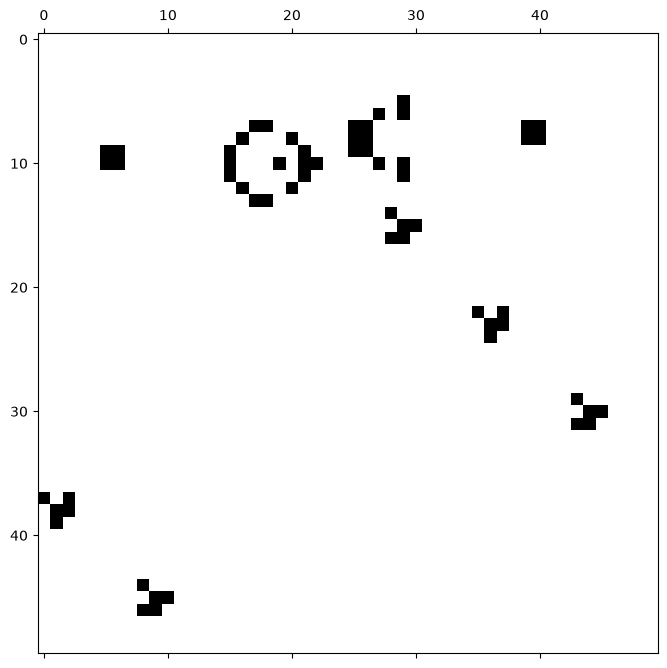
可視化(アニメーション)
時間発展は Plotly のアニメーションで可視化する(再生ボタンとスライダーが付く).
各世代の場 field_list をフレームとして並べる.Play/Fast/Slow で再生速度を切り替えられる.詳しくは Plotly を参照.
# 可視化(アニメーション)
frames = [
    go.Frame(
        data=[
            go.Heatmap(
                z=field_list[k], colorscale="Greys", zmin=0, zmax=1, showscale=False
            )
        ],
        name=str(k),
    )
    for k in range(len(field_list))
]

fig = go.Figure(
    data=[
        go.Heatmap(
            z=field_list[0], colorscale="Greys", zmin=0, zmax=1, showscale=False
        )
    ],
    frames=frames,
)


def play_button(label, duration):
    """1フレームを duration ミリ秒で表示して再生するボタン(小さいほど速い)"""
    return {
        "label": label,
        "method": "animate",
        "args": [
            None,
            {
                "frame": {"duration": duration, "redraw": True},
                "fromcurrent": True,
                "transition": {"duration": 0},
            },
        ],
    }


fig.update_layout(
    width=600,
    height=660,
    margin={"l": 20, "r": 20, "t": 70, "b": 20},
    yaxis={"scaleanchor": "x", "autorange": "reversed"},
    updatemenus=[
        {
            "type": "buttons",
            "direction": "right",
            "showactive": False,
            "x": 0.5,
            "xanchor": "center",
            "y": 1.08,
            "yanchor": "bottom",
            "buttons": [
                play_button("Play", 120),
                play_button("Fast", 40),
                play_button("Slow", 300),
                {
                    "label": "Pause",
                    "method": "animate",
                    "args": [[None], {"frame": {"duration": 0}, "mode": "immediate"}],
                },
            ],
        }
    ],
    sliders=[
        {
            "steps": [
                {"label": str(k), "method": "animate", "args": [[str(k)]]}
                for k in range(len(frames))
            ]
        }
    ],
)
fig.show()ライフゲームのパターンの例
LifeWikiにて,多数のパターンを見つけることができる.
また,パターンをテキストしてコピーしたり,ファイルとしてダウンロードできる.
以下にはいくつかの例を示す.
グライダー
# グライダー
ptn_glider = np.array([[1, 1, 1], [1, 0, 0], [0, 1, 0]], dtype=int)回転花火
# 回転花火
ptn_pinwheel = np.array(
    [
        [0, 0, 0, 0, 0, 0, 1, 1, 0, 0, 0, 0],
        [0, 0, 0, 0, 0, 0, 1, 1, 0, 0, 0, 0],
        [0, 0, 0, 0, 0, 0, 0, 0, 0, 0, 0, 0],
        [0, 0, 0, 0, 1, 1, 1, 1, 0, 0, 0, 0],
        [1, 1, 0, 1, 0, 0, 0, 0, 1, 0, 0, 0],
        [1, 1, 0, 1, 0, 0, 1, 0, 1, 0, 0, 0],
        [0, 0, 0, 1, 0, 0, 0, 1, 1, 0, 1, 1],
        [0, 0, 0, 1, 0, 1, 0, 0, 1, 0, 1, 1],
        [0, 0, 0, 0, 1, 1, 1, 1, 0, 0, 0, 0],
        [0, 0, 0, 0, 0, 0, 0, 0, 0, 0, 0, 0],
        [0, 0, 0, 0, 1, 1, 0, 0, 0, 0, 0, 0],
        [0, 0, 0, 0, 1, 1, 0, 0, 0, 0, 0, 0],
    ],
    dtype=int,
)グライダー銃
# グライダー銃
ptn_glidergun = np.array([
    [0, 0, 0, 0, 0, 0, 0, 0, 0, 0, 0, 0, 0, 0, 0, 0, 0, 0, 0, 0, 0, 0, 0, 0, 1, 0, 0, 0, 0, 0, 0, 0, 0, 0, 0, 0],
    [0, 0, 0, 0, 0, 0, 0, 0, 0, 0, 0, 0, 0, 0, 0, 0, 0, 0, 0, 0, 0, 0, 1, 0, 1, 0, 0, 0, 0, 0, 0, 0, 0, 0, 0, 0],
    [0, 0, 0, 0, 0, 0, 0, 0, 0, 0, 0, 0, 1, 1, 0, 0, 0, 0, 0, 0, 1, 1, 0, 0, 0, 0, 0, 0, 0, 0, 0, 0, 0, 0, 1, 1],
    [0, 0, 0, 0, 0, 0, 0, 0, 0, 0, 0, 1, 0, 0, 0, 1, 0, 0, 0, 0, 1, 1, 0, 0, 0, 0, 0, 0, 0, 0, 0, 0, 0, 0, 1, 1],
    [1, 1, 0, 0, 0, 0, 0, 0, 0, 0, 1, 0, 0, 0, 0, 0, 1, 0, 0, 0, 1, 1, 0, 0, 0, 0, 0, 0, 0, 0, 0, 0, 0, 0, 0, 0],
    [1, 1, 0, 0, 0, 0, 0, 0, 0, 0, 1, 0, 0, 0, 1, 0, 1, 1, 0, 0, 0, 0, 1, 0, 1, 0, 0, 0, 0, 0, 0, 0, 0, 0, 0, 0],
    [0, 0, 0, 0, 0, 0, 0, 0, 0, 0, 1, 0, 0, 0, 0, 0, 1, 0, 0, 0, 0, 0, 0, 0, 1, 0, 0, 0, 0, 0, 0, 0, 0, 0, 0, 0],
    [0, 0, 0, 0, 0, 0, 0, 0, 0, 0, 0, 1, 0, 0, 0, 1, 0, 0, 0, 0, 0, 0, 0, 0, 0, 0, 0, 0, 0, 0, 0, 0, 0, 0, 0, 0],
    [0, 0, 0, 0, 0, 0, 0, 0, 0, 0, 0, 0, 1, 1, 0, 0, 0, 0, 0, 0, 0, 0, 0, 0, 0, 0, 0, 0, 0, 0, 0, 0, 0, 0, 0, 0]
], dtype=int)パン屋
# パン屋
ptn_baker = np.array([
    [0, 0, 0, 0, 0, 0, 0, 0, 0, 0, 0, 0, 0, 0, 1, 1],
    [0, 0, 0, 0, 0, 0, 0, 0, 0, 0, 0, 0, 0, 1, 0, 1],
    [0, 0, 0, 0, 0, 0, 0, 0, 0, 0, 0, 0, 1, 0, 0, 0],
    [0, 0, 0, 0, 0, 0, 0, 0, 0, 0, 0, 1, 0, 0, 0, 0],
    [0, 0, 0, 0, 0, 0, 0, 0, 0, 0, 1, 0, 0, 0, 0, 0],
    [0, 0, 0, 0, 0, 0, 0, 0, 0, 1, 0, 0, 0, 0, 0, 0],
    [0, 0, 0, 0, 0, 0, 0, 0, 1, 0, 0, 0, 0, 0, 0, 0],
    [0, 0, 0, 0, 0, 0, 0, 1, 0, 0, 0, 0, 0, 0, 0, 0],
    [0, 0, 0, 0, 0, 0, 1, 0, 0, 0, 0, 0, 0, 0, 0, 0],
    [0, 0, 0, 0, 0, 1, 0, 0, 0, 0, 0, 0, 0, 0, 0, 0],
    [0, 0, 0, 0, 1, 0, 0, 0, 0, 0, 0, 0, 0, 0, 0, 0],
    [0, 0, 0, 1, 0, 0, 0, 0, 0, 0, 0, 0, 0, 0, 0, 0],
    [1, 1, 1, 0, 0, 0, 0, 0, 0, 0, 0, 0, 0, 0, 0, 0],
    [0, 1, 0, 0, 0, 0, 0, 0, 0, 0, 0, 0, 0, 0, 0, 0]
], dtype=int)