01 型変換,関数の使い方
型変換
暗黙の型変換
特定の場合には型の変換が自動で行われる.
# 01-01. 暗黙の型変換
# 数値同士の演算,print関数
a = 5
b = 2
c = 3.3
d = 6.5 + 2j

print("type(a):", a, type(a))
print("type(b):", b, type(b))
print("type(c):", c, type(c))
print("type(d):", d, type(d))
type(a): 5 <class 'int'>
type(b): 2 <class 'int'>
type(c): 3.3 <class 'float'>
type(d): (6.5+2j) <class 'complex'>
e = a + c
f = a + d
g = a / b
h = a * c

print("type(e):", e, type(e))
print("type(f):", f, type(f))
print("type(g):", g, type(g))
print("type(h):", h, type(h))
type(e): 8.3 <class 'float'>
type(f): (11.5+2j) <class 'complex'>
type(g): 2.5 <class 'float'>
type(h): 16.5 <class 'float'>
1 + "1"---------------------------------------------------------------------------
TypeError Traceback (most recent call last)
Cell In[3], line 1
----> 1 1 + "1"
TypeError: unsupported operand type(s) for +: 'int' and 'str'明示的型変換
Pythonでは,基本的には型変換は明示的に指定する.
# 01-02. 明示的型変換
## str
a = str(1)
b = str(True)
c = str(5.2)

print("str(1): ", a, type(a))
print("str(True): ", b, type(b))
print("str(5.2): ", c, type(c))
str(1): 1 <class 'str'>
str(True): True <class 'str'>
str(5.2): 5.2 <class 'str'>
# 文字列の結合への利用
print("str" + str(21))
str21
## int
a = int("1")
b = int("010")
c = int(False)
d = int(10.0)

print('int("1"): ', a, type(a))
print('int("010"): ', b, type(b))
print('int("False"): ', c, type(c))
print('int("10.0"): ', d, type(d))
int("1"): 1 <class 'int'>
int("010"): 10 <class 'int'>
int("False"): 0 <class 'int'>
int("10.0"): 10 <class 'int'>
# float
a = float("-6.31")
b = float("5e-006")
c = float(1)
d = float(False)

print('float("-6.31"): ', a, type(a))
print('float("5e-006"): ', b, type(b))
print('float("1"): ', c, type(c))
print('float("False"): ', d, type(d))
float("-6.31"): -6.31 <class 'float'>
float("5e-006"): 5e-06 <class 'float'>
float("1"): 1.0 <class 'float'>
float("False"): 0.0 <class 'float'>
関数を鍛える
グローバル変数
関数の外で定義した変数(グローバル変数 (global variable))は関数の中からも参照できる.
# 01-03. グローバル変数
s = "Hello, World!"


def print_hello_global():
print(s)print_hello_global()Hello, World!
グローバル変数とローカル変数
関数の中で代入された変数はローカル変数 (local variable)となり,同名のグローバル変数より優先される.
# 01-04. グローバル変数とローカル変数
s = "Hello, World!"


def print_hello_local():
    s = "こんにちは世界!"
print(s)print_hello_local()こんにちは世界!
グローバル変数は関数内で書き換えられない
関数内に同名変数への代入があると関数全体でローカル扱いとなり,代入前の参照もエラーになる.
# 01-05. グローバル変数は関数内で書き換えられない
s = "Hello, World!"


def print_hello_local():
    print(s)
    s = "こんにちは世界!"
print(s)print_hello_local()---------------------------------------------------------------------------
UnboundLocalError Traceback (most recent call last)
Cell In[13], line 1
----> 1 print_hello_local()
Cell In[12], line 6, in print_hello_local()
5 def print_hello_local():
----> 6 print(s)
7 s = "こんにちは世界!"
8 print(s)
UnboundLocalError: cannot access local variable 's' where it is not associated with a valueパラメータのデフォルト値
パラメータにデフォルト値を設定すると,呼び出し時の指定を省略できる.
# 01-06. パラメータのデフォルト値
def func1(a, b="srt1"):
    print(a, b)
func1(1, 2)1 2
func1(1)1 srt1
func1(1, b=2)1 2
func1(b=1)---------------------------------------------------------------------------
TypeError Traceback (most recent call last)
Cell In[18], line 1
----> 1 func1(b=1)
TypeError: func1() missing 1 required positional argument: 'a'複数の戻り値
return をカンマで区切ると複数の値をタプルとして返せる.
# 01-07. 複数の戻り値
def func_multi(a):
    return a, a**2, a**3
x, y, z = func_multi(2)print(x, y, z)2 4 8
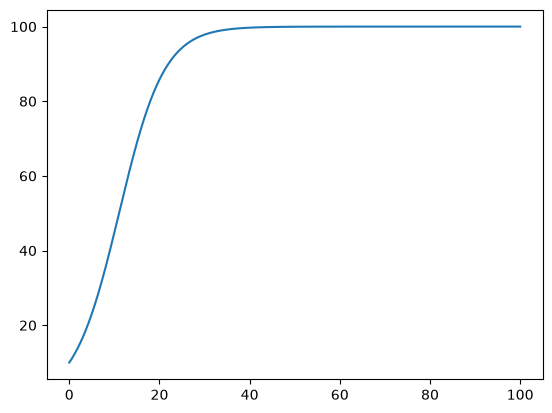
ロジスティック成長(数値解)
P1-04 のロジスティック成長のシミュレーションを関数を使って書き直す.
# 01-08. ロジスティック成長(数値解)
import matplotlib.pyplot as plt
def logistic_growth(r, K, x0, t_end, dt=0.1):
x = x0
t_list = [0]
x_list = [x]
i_end = int(t_end / dt)
for i in range(i_end):
t = dt * (i + 1)
x = x + dt * r * (1 - x / K) * x
t_list.append(t)
x_list.append(x)
return t_list, x_listt_list, x_list = logistic_growth(0.2, 100, 10, 100)plt.plot(t_list, x_list)